

Free Online PDF Metadata Editor: Modify Document Properties & SEO Tags
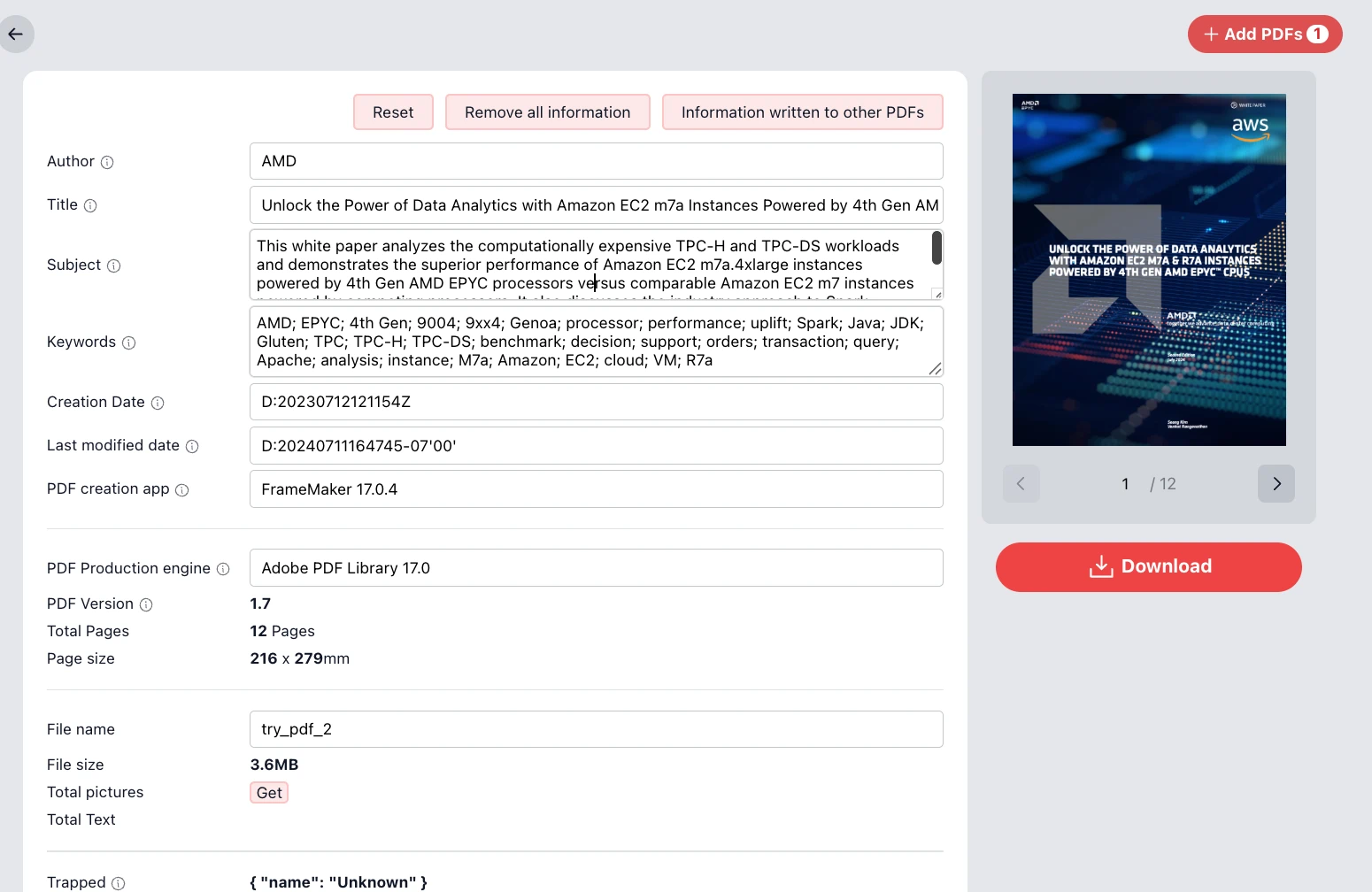
Master your document's identity. Edit titles, authors, subjects, and keywords with 100% client-side privacy.
Unlock the Power of Data Analytics and Searchability
In the digital age, a PDF is more than just visible text; it is a container of hidden data known as Metadata (or Document Properties). This hidden layer dictates how search engines, operating systems, and content management systems interpret your file. Our PDF Metadata Editor empowers you to take full control of this data without the need for expensive software like Adobe Acrobat Pro.
Whether you are an author publishing a white paper, a legal professional organizing case files, or a student submitting a thesis, accurate metadata is crucial. It ensures your "Title" looks professional in browser tabs, your "Author" name is correctly attributed, and your "Keywords" help the document surface in internal and external searches.
100% Privacy: Your Files Never Leave Your Device
Security is our top priority. Unlike other online tools that require you to upload your sensitive documents to a remote server for processing, our tool operates entirely within your web browser.
- No File Uploads: The PDF processing engine runs locally on your device.
- No Login Required: Access all features instantly without registration.
- Zero Data Leaks: Since the file never travels over the internet, your confidential data remains completely secure.
Comprehensive Metadata Editing Features
Our interface provides a granular view of your PDF's internal structure. You can view and modify standard PDF tags to optimize how your file is indexed by search engines (SEO) and PDF readers.
Editable Fields Include:
- Author: Correct the creator name. Change "Administrator" or "Microsoft Word" to your actual name or organization.
- Title: This is arguably the most important field for SEO. It is often displayed in search results and browser title bars instead of the filename.
- Subject: A brief description of the document content, often used by accessibility tools.
- Keywords: Comma-separated values (e.g., "AMD; EPYC; 4th Gen; Processor") that assist in categorization and search indexing.
- Creation & Modification Dates: Adjust timestamps to reflect the actual publication timeline or project constraints.
- Application Data: View (and sometimes obscure) the "PDF Producer" or "Creator" tool (e.g., FrameMaker 17.0) used to generate the file.
Advanced Controls: Scrubbing and Batch Application
Beyond simple editing, our tool offers powerful workflow utilities designed for efficiency and privacy protection. Two critical features distinguish this editor:
1. Remove All Information (Data Sanitization)
With a single click of the Remove all information button, you can instantly strip the document of all metadata. This is essential for:
- Anonymization: Removing personal names and software versions before public release.
- Security: Preventing metadata leakage that could reveal internal network paths or user account names often hidden in the "Creator" fields.
- Clean Slate: Resetting a document's properties to default before adding new, targeted SEO tags.
2. Information Written to Other PDFs (Batch Synchronization)
If you are managing a library of documents (e.g., a series of reports or a collection of invoices), typing the same metadata repeatedly is tedious. The Information written to other PDFs button allows you to take the metadata currently entered in the active form (Author, Keywords, Subject) and instantly apply it to all other PDF files currently loaded in your session. This ensures consistency across your document set in seconds.
Frequently Asked Questions (Q&A)
Editing metadata improves the Search Engine Optimization (SEO) of your PDF files. When Google or corporate search tools index your file, they look at the Title and Keywords properties. Proper metadata ensures your document ranks higher and is easier to find. It also ensures a professional appearance when the file is opened in viewers.
Yes, absolutely. This tool uses 100% client-side processing. Your PDF file is loaded into your browser's memory and modified locally. It is never uploaded to a cloud server, meaning no one else can access your data.
Yes. By using the "Remove all information" feature or manually editing the fields, you can remove references to the software used to create the PDF (such as Adobe FrameMaker or Microsoft Word), giving your document a generic, clean profile.
No. We do not add watermarks or branding to your documents. The tool is designed strictly for modifying the file's properties (XMP data and Info Dictionary) without altering the visual content on the pages.
The Reset button reverts any changes you have made in the form fields back to the original values found in the PDF when you first loaded it. This is useful if you make a mistake while editing and want to start over.