

Crop PDF Files Online: The Ultimate Private & Secure Tool
Welcome to the most secure and versatile solution for cropping PDF documents directly in your web browser. Whether you need to trim excess white space, adjust page sizes for printing, or standardize the layout of a scanned document, our Crop PDF Files tool provides a professional-grade interface without the need for expensive software. Unlike other online tools that require you to upload your sensitive data to remote servers, our technology processes your files locally on your device. This means your documents never leave your computer, ensuring 100% privacy and security.
Why Use Our Browser-Based PDF Cropper?
In the digital age, data privacy is paramount. Traditional online PDF editors force you to upload your contracts, invoices, and personal files to a cloud server to be processed. This creates a potential vulnerability. Our tool is different. We utilize advanced web assembly technologies to bring the processing power to you. No login, no registration, and absolutely no file uploads are required. The file processing happens entirely within your browser's sandbox environment.
Core Features and Capabilities
Our tool is not just a simple cutter; it is a comprehensive page geometry manager designed for both casual users and professionals.
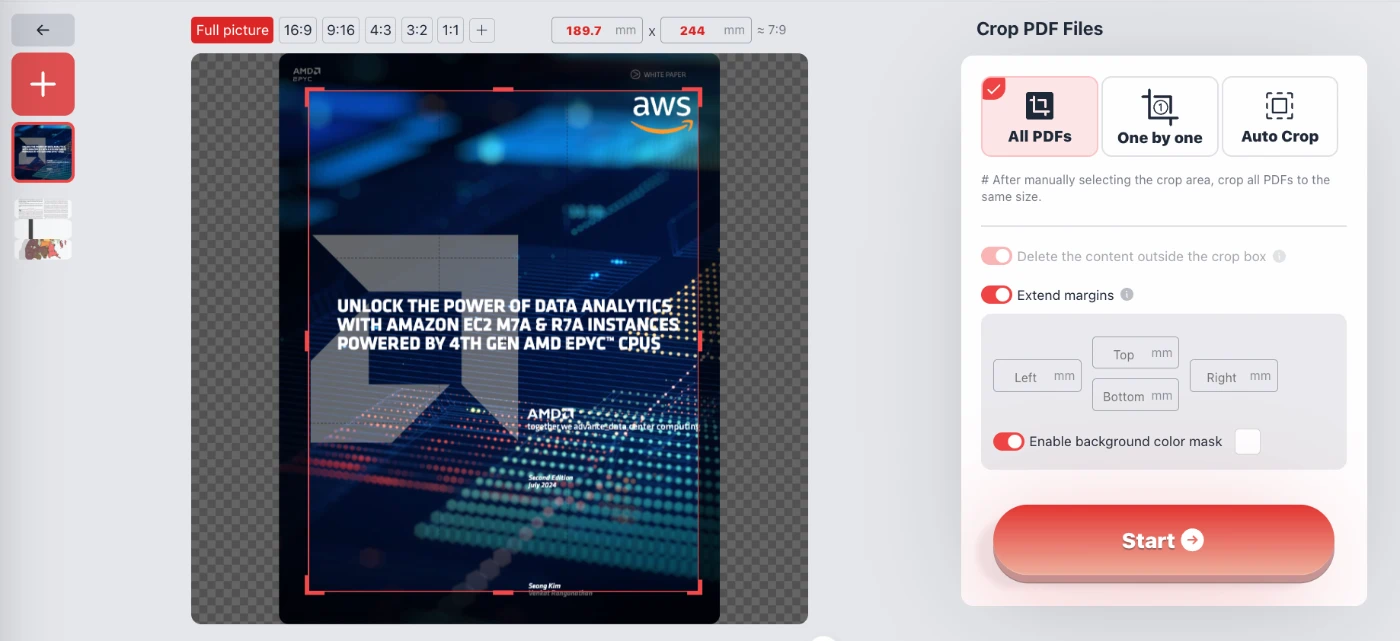
- Precision Manual Cropping: You have full control over the crop box. You can manually drag the handles to define the visible area or input exact measurements in millimeters for the top, bottom, left, and right margins. This is ideal for preparing documents for specific print dimensions.
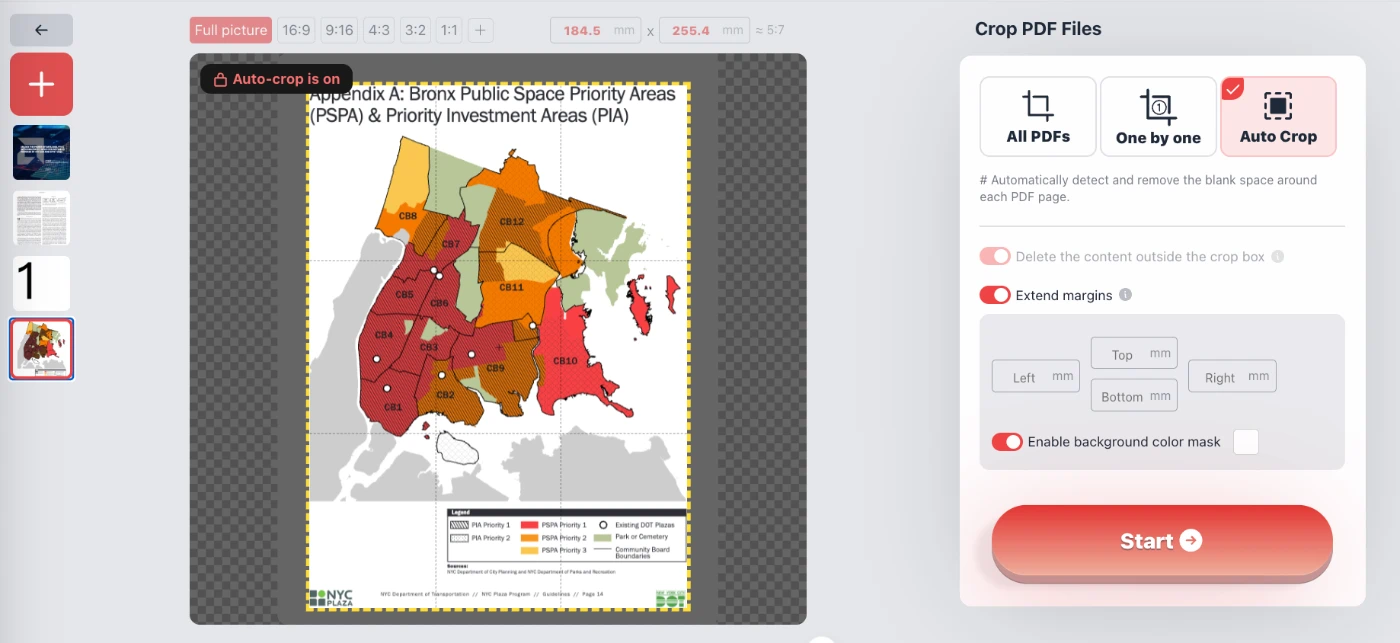
- Intelligent Auto-Crop: If your PDF contains scanned receipts or charts surrounded by unnecessary white space, the "Auto Crop" feature automatically detects the content boundaries and removes the blank margins, optimizing the file for reading on mobile devices or tablets.
- Standard Aspect Ratios: Quickly resize your pages to standard formats. With a single click, enforce aspect ratios such as 16:9, 4:3, 1:1 (Square), 3:2, or 9:16. This is particularly useful for presentation slides or preparing digital assets.
- Batch Processing ("All PDF"): Do you have 30 PDF documents where the same header needs to be removed from every page? Select the "All PDF Files" mode to apply the same cropping mask to all PDF documents simultaneously, saving you hours of manual work.
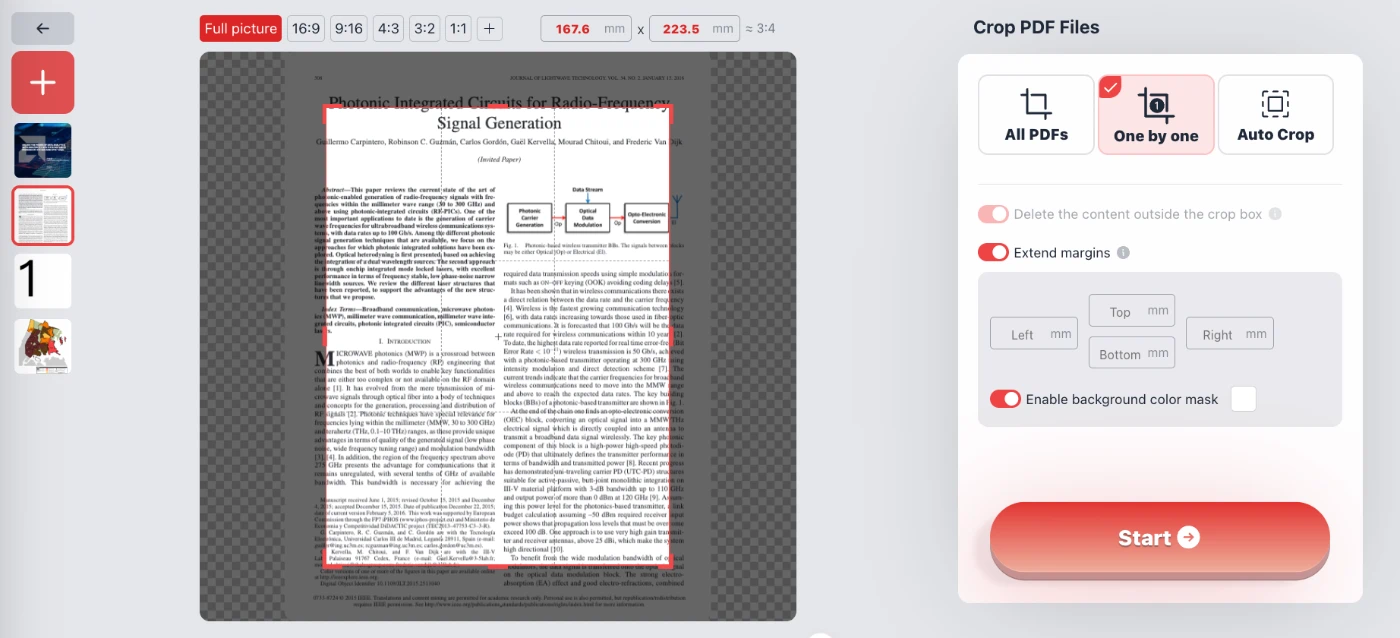
- Page-by-page adjustment ("One by One"): For PDF documents with varying layouts, such as mixed documents containing images and text, you can crop each PDF individually to ensure that each page is perfectly presented.
- Extend Margins: Cropping isn't always about reducing size. Our tool allows you to "Extend margins," effectively adding white space (padding) around your content. This is perfect for adding room for binding, punch holes, or annotations.
How to Crop PDF Pages
Using the tool is intuitive and requires no technical skills. Follow these simple steps to resize your PDF:
- Select Your File: Open your PDF file directly in the browser. Remember, the file stays on your device.
- Choose a Mode:
- All PDFs: Apply the same cropping box to all imported PDF documents.
- One by One: You can set different cropping areas for each PDF.
- Auto Crop: Focus on the area containing relevant content and automatically remove the white areas.
- Adjust the Area: Use the visual editor to resize the red crop box. You can use the preset aspect ratio buttons (like 1:1 or 16:9) or type in exact millimeter values. You can also toggle "Delete content outside crop box" or "Enable background color mask" to visualize the result.
- Start Processing: Click the "Start" button. The browser will process the geometry changes instantly and generate a new, cropped PDF file for you to save.
Frequently Asked Questions (QA)
Is it safe to crop confidential legal documents here?
Yes, absolutely. This tool operates entirely client-side. Unlike other web services that require you to upload your PDF to a cloud server for processing, our tool runs the code inside your own browser. Your confidential legal documents, bank statements, or personal IDs never leave your computer. It is as secure as using offline software.
Can I crop multiple PDFs at once?
Yes. Select the "All PDFs" tab in the interface to draw a cropping box, which will be applied to all pages of all PDFs. This is ideal for removing consistent headers, footers, or page numbers from multiple PDF reports.
Does this tool reduce the quality of my PDF?
No. The cropping process only alters the visible page boundaries (MediaBox and CropBox) of the PDF file. It does not re-compress images or alter the resolution of your text, ensuring that your document remains crisp and high-quality.
Can I add margins instead of removing them?
Yes. By enabling the "Extend margins" switch, you can increase the canvas size of your PDF pages. This allows you to add extra white space around your content, which is useful for printing preparation or making room for notes.
Is this service really free?
Yes, the tool is completely free to use. There are no hidden costs, no watermarks added to your cropped files, and no requirement to create an account or provide an email address.
What happens to the content outside the crop area?
You have the option to control this. You can choose to simply hide the content (non-destructive) or check the "Delete the content outside the crop box" option to permanently remove text and images that fall outside your selected area, which can help reduce file size.