

Remove PDF Blank Pages Automatically
Optimize your documents instantly with our AI-powered tool. It automatically detects and deletes empty pages from scanned or digital PDFs. Processing happens 100% locally in your browser for total privacy—no uploads or registration required.
Try these now PDFs:
Does this online conversion service protect my privacy? Are the files I import safe?
Very safe, because your files never leave your device and are not uploaded. ImagesTool uses browser technology to achieve the conversion service that previously required uploading.
Everything happens only in your browser, 100% protecting your privacy.
You can do a test Convert once, then disconnect the device from the network, and convert again and you will find that everything is normal.
Remove PDF Blank Pages Automatically
Optimize your documents instantly with our professional PDF blank page remover. This tool is designed to automatically detect and delete empty pages from your PDF files, ensuring a clean and concise document for printing or sharing. Whether it is a scanned document or a digital export with extra white space, our algorithm identifies pages with zero content and removes them in seconds.
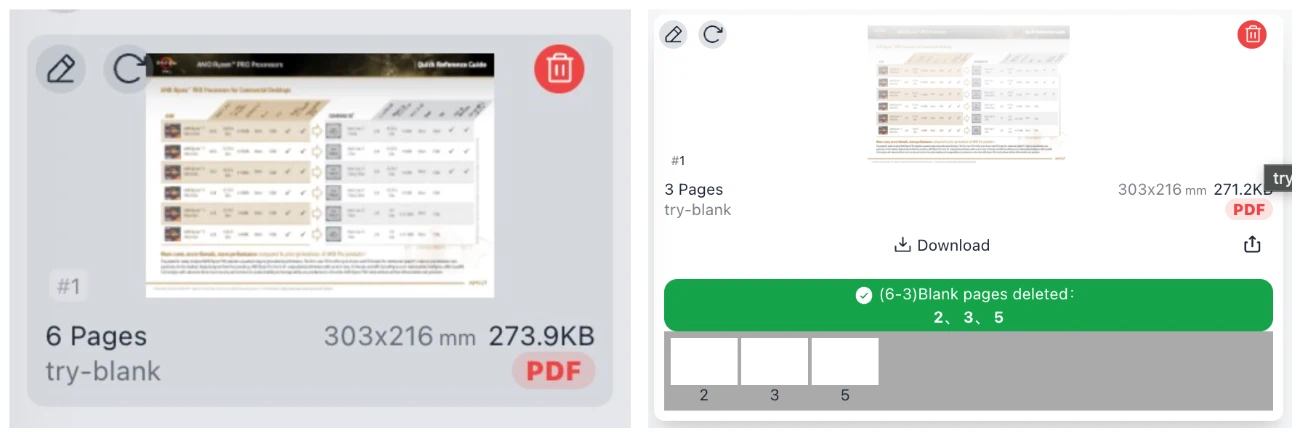
100% Private & Browser-Based Processing
Your privacy and data security are our top priorities. Unlike traditional online editors, our tool performs all operations locally within your browser. This means:
- Privacy Security: 100% guaranteed. Your PDF files never leave your device.
- No Uploads: No need to upload sensitive documents to any external server.
- No Account Needed: No registration or login required to access full features.
- Instant Results: Since no file transfer is involved, the process is lighting fast.
Frequently Asked Questions
How does the automatic detection work?
Our tool scans each page for text, images, and vector graphics. If a page is found to contain no renderable elements, it is marked for deletion.
Are my files safe?
Yes. Because the processing happens entirely in your browser's memory, no data is ever transmitted to our servers. Your documents stay under your control at all times.
Is there a file size limit?
Since the tool uses your local hardware resources, it can handle large PDFs efficiently without the typical upload limits of cloud-based services.
Is this service free?
Absolutely. You can remove blank pages from as many PDFs as you need without any subscription or hidden fees.