

Convert PDF to Long Image: Seamless Vertical Stitching
Transform your multi-page PDF documents into a single, continuous vertical image with our advanced PDF to Long Image Converter. In the digital age, sharing extensive documents on mobile platforms or social media apps often requires a format that supports seamless scrolling. Unlike standard PDF viewers that break content into rigid pages, converting a PDF to a long image (JPG/PNG) ensures a fluid reading experience perfect for infographics, long screenshots, and mobile archives.
Our tool is engineered for precision and flexibility, allowing you to stitch images vertically, control output width, and manage file sizes intelligently. Best of all, we prioritize your data security with a client-side processing model that guarantees your files never leave your device.
Figure 1: Visual representation of stitching multiple PDF pages into one continuous vertical strip.
Key Features and Capabilities
1. 100% Private & Secure Processing
Security is our top priority. Unlike many online converters that upload your sensitive documents to a remote server, our tool operates entirely within your browser. Your files never leave your device. The conversion from PDF to image happens locally using your computer's processing power. This makes it safe for legal contracts, financial statements, and personal data.
2. Smart Vertical Stitching
The core functionality takes every selected page of your PDF and renders it as a high-quality image. These images are then logically arranged from top to bottom and stitched together. This creates a "webtoon" or "long screenshot" style effect, eliminating the need to flip pages.
3. Advanced Image Quality & Size Control
We provide two distinct modes for managing the output quality, giving you control over the file size versus visual fidelity balance:
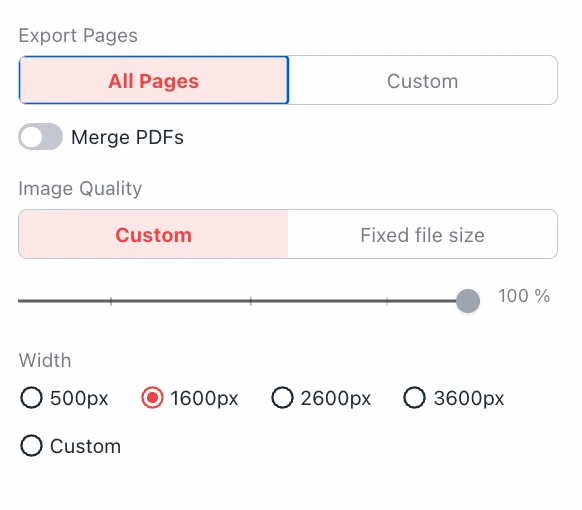
- Custom Quality: Use a slider to manually adjust the compression level from 0% to 100%. High percentages retain crisp text details, while lower percentages reduce file size significantly.
- Fixed File Size: A unique feature for users with strict upload limits (e.g., email attachments or portal uploads). You can specify a target size (e.g., 1500 KB). The tool will intelligently calculate and automatically set the image quality to match this set value.
Configuration Guide
To ensure the perfect output, our tool offers a granular set of options before you begin the conversion process:
Export Pages Selection
You don't have to convert the entire document.
All Pages: Converts the complete document from start to finish.
Custom Range: Allows you to specify exact page numbers (e.g., "5, 6-10"). This is ideal for extracting specific chapters or sections to create a focused long image.
Width Settings
Controlling the pixel width is crucial for readability on different devices. You can select from standard presets or define a custom width:
- 500px: Optimized for small mobile screens and thumbnails.
- 1600px: The standard high-definition width, suitable for most desktop monitors and tablets.
- 2600px & 3600px: Ultra-high resolution for printing or zooming into fine details.
- Custom: Input any pixel width to fit specific design requirements.
Note: If choosing "Fixed File Size," ensure your Width setting is suitable. If the width is too large for the target file size, the quality may drop too low, causing the output to fail.
Technical Limitations & Solutions
Browsers and image formats have technical limits on how large a single image canvas can be. If your resulting stitched image exceeds 268,435,456 pixels in total area, our system automatically detects this. Instead of crashing, it will intelligently divide the output into multiple long images, ensuring data integrity and downloadability.
Privacy Guaranteed: Local Browser Processing
Frequently Asked Questions (Q&A)
- Q: Is this PDF to Long Image converter free?
- A: Yes, the tool is completely free to use with no hidden costs. You can convert as many files as you need without registration.
- Q: Will my files be uploaded to the cloud?
- A: No. We use client-side technology. Your PDF is processed directly in your browser's memory. This means your data never travels over the internet, ensuring 100% privacy.
- Q: What happens if I set a "Fixed File Size" that is too small?
- A: If you set a very small file size (e.g., 100KB) for a very large image (e.g., 3600px width), the compression required would be too high, making the image unreadable. The tool may warn you or fail to generate the image. We recommend balancing the width and target file size.
- Q: Can I merge multiple PDF files before converting to an image?
- A: Yes, there is a "Merge PDFs" toggle available. This allows you to combine content from different PDF documents into a single long scrolling image.
- Q: Why was my output split into two images?
- A: This occurs due to the maximum pixel limit of image formats and browser memory (approx. 268 million pixels). To prevent corruption, we automatically split extremely long files into manageable segments.