

Free PDF to JPG Converter: Secure, Private & Batch Processing
Convert PDF to JPG instantly in your browser. 100% Private (No file uploads), Unlimited Batch Processing, and High Resolution (up to 12000px). Free & Secure.
Try these now PDFs:
Does this online conversion service protect my privacy? Are the files I import safe?
Very safe, because your files never leave your device and are not uploaded. ImagesTool uses browser technology to achieve the conversion service that previously required uploading.
Everything happens only in your browser, 100% protecting your privacy.
You can do a test Convert once, then disconnect the device from the network, and convert again and you will find that everything is normal.
PDF to JPG Secure Converter
Looking for a way to convert PDF to JPG high quality without risking your privacy? You've found it. Unlike other "free" tools that require you to upload your sensitive documents to their servers, my tool runs 100% locally in your browser. It uses advanced WebAssembly technology to turn your device into a powerful conversion engine. No uploads, no waiting, no registration—just fast, secure, and unlimited batch conversion.
Why "Local" Matters: My Tool vs. Traditional Online Converters
Most online PDF converters work the same way: you upload your file, they process it on a remote server, and you download it back. I built this tool differently because I believe your data should stay yours.
| Feature | My Local Tool (Client-Side) | Others (Server-Side) |
|---|---|---|
| Privacy | 100% Private. Files never leave your device. | Files are uploaded to a cloud server. |
| Speed | Instant. No upload/download waiting time. | Slow. Depends on your internet speed. |
| File Limits | Unlimited. Convert 500MB+ files if your RAM allows. | Usually capped (e.g., max 2 files/hour). |
| Security | Browser sandbox (Safest). | Unknown server environment. |
Core Features for Power Users
- True Batch Conversion: Drop in 50 PDFs at once. The tool handles them in parallel and zips them up automatically.
- Extreme Resolution Support: Need to print a poster? Support for output widths up to 12,000px. Most tools crash above 5000px.
- Smart Folder Organization: The downloaded ZIP isn't a mess. It creates structured folders:
PDF_Name/PDF1_JPG1.jpg. - Offline Capability: Once the page loads, you can disconnect your internet. It still works.
- Custom Page Ranges: Extract only what you need (e.g.,
1-5, 10, 20-25) to save processing time.
This tool is part of the imagesTool.com project, dedicated to building serverless, privacy-first web utilities.
How to Convert PDF to JPG (Step-by-Step)
- Drag & Drop
Simply drag your PDF files onto the box above. You can paste them (Ctrl+V) directly too. - Tweak Settings (Optional)
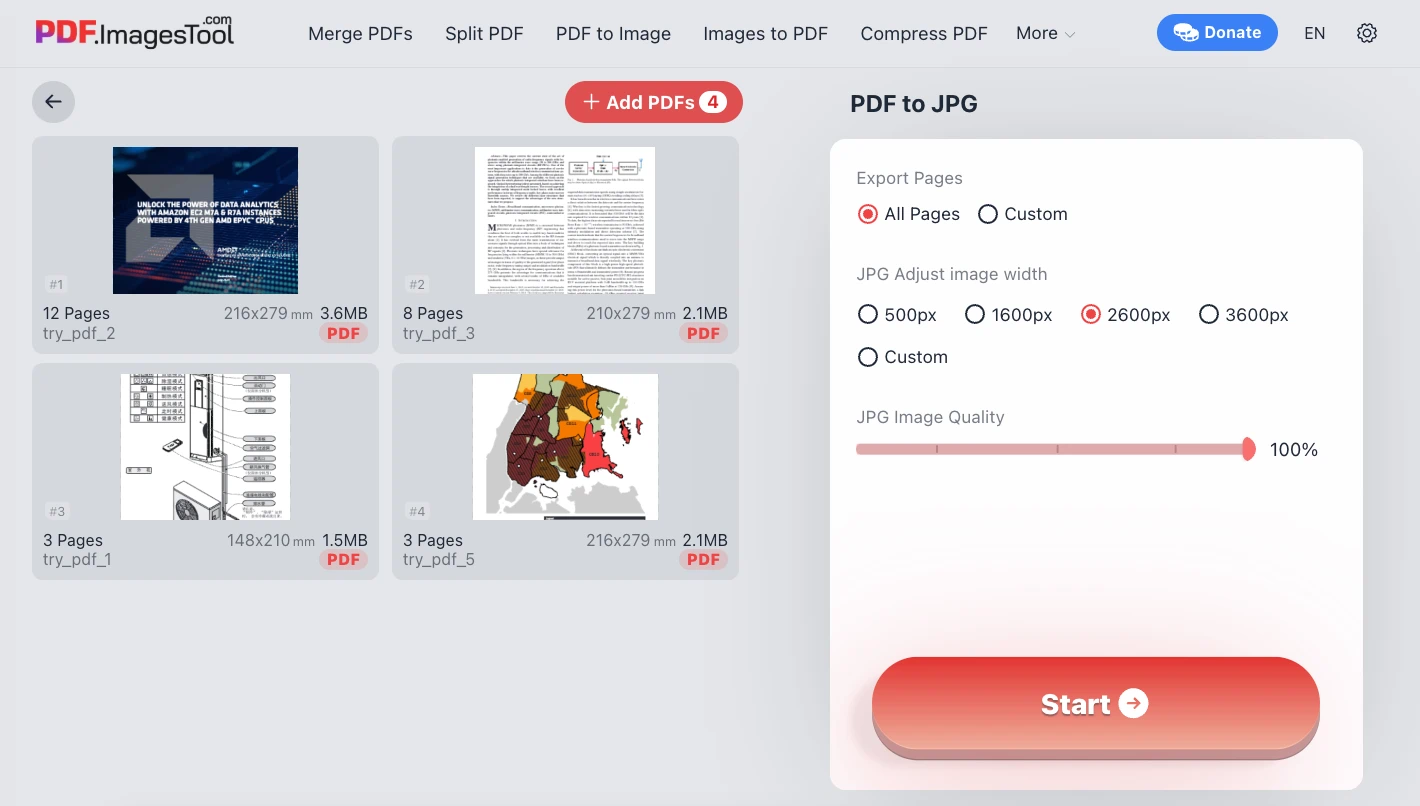
- Resolution: Default is 2600px (great for reading). Increase to 4000px+ for printing.
- Quality: Adjust the JPG compression (0-100%) to control file size.
- Ranges: Specify page numbers if you don't need the whole document.
- Convert & Save
Click "Start". The WebAssembly engine kicks in. Once finished, hit "Download ZIP".
Note: The first run might take a few seconds to initialize the local engine. Subsequent runs are instant.
FAQ: Common Questions
Is it really safe to convert confidential contracts here?
Yes. Unlike installed software that might have root access to your OS, this tool runs in the browser's "Sandbox" environment. It literally cannot access your other files or send data out without your permission.After a successful run, closing the network and running it again will still allow the conversion to proceed, proving that no uploading is taking place.
Why is this faster than ilovepdf or smallpdf?
Because you skip the "Upload" and "Download" phase. If you have a 50MB PDF, you don't need to send 50MB of data across the internet. Your CPU processes it immediately.
How do I convert PDF to JPG without losing quality?
Set the "Width" to Custom and enter a value like 4000 or 6000. Keep the Quality slider at 100%. This ensures crisp text and sharp images.
Can I use this on Mac, Windows, or Linux?
Absolutely. It works on any modern browser (Chrome, Edge, Firefox, Safari) on any operating system.
Why does the first conversion say "Loading module"?
We are downloading the conversion code to your computer effectively "installing" the tool into your browser's temporary memory. This only happens once.
Can I use a PDF to JPG converter on my mobile phone?
Yes, modern mobile browsers are powerful enough. I tested the converter on my iPhone 13 using the Safari browser and it worked perfectly.
Developer Tips for Best Results
- Web Use: 1600px width @ 85% quality = Best balance.
- Print/Archive: 3600px+ width @ 100% quality.
- Preview: 500px width for instant thumbnails.
Final Thoughts
I created this tool because I was tired of uploading my personal documents to random servers just to get a JPG back. It seemed unnecessary and unsafe. This converter is my solution: browser-based, private, and geekily powerful. It uses your hardware, not mine, so it's free for everyone forever. Enjoy the privacy!
Universal Image Converter Image Compressor Image Stitcher Smart Crop Watermark Tool AI Background Remover